Campaign set · 9 images
Social App Instagram Post Set
Instagram Post Sets
Way 2 · only some AI modelsThe whole set at onceOne master prompt that makes every design together.
Master prompt
Use this only if your AI model can make many images together in one go (multi-image generation). If it makes one image at a time, the result will not match. Use the separate prompts below instead.
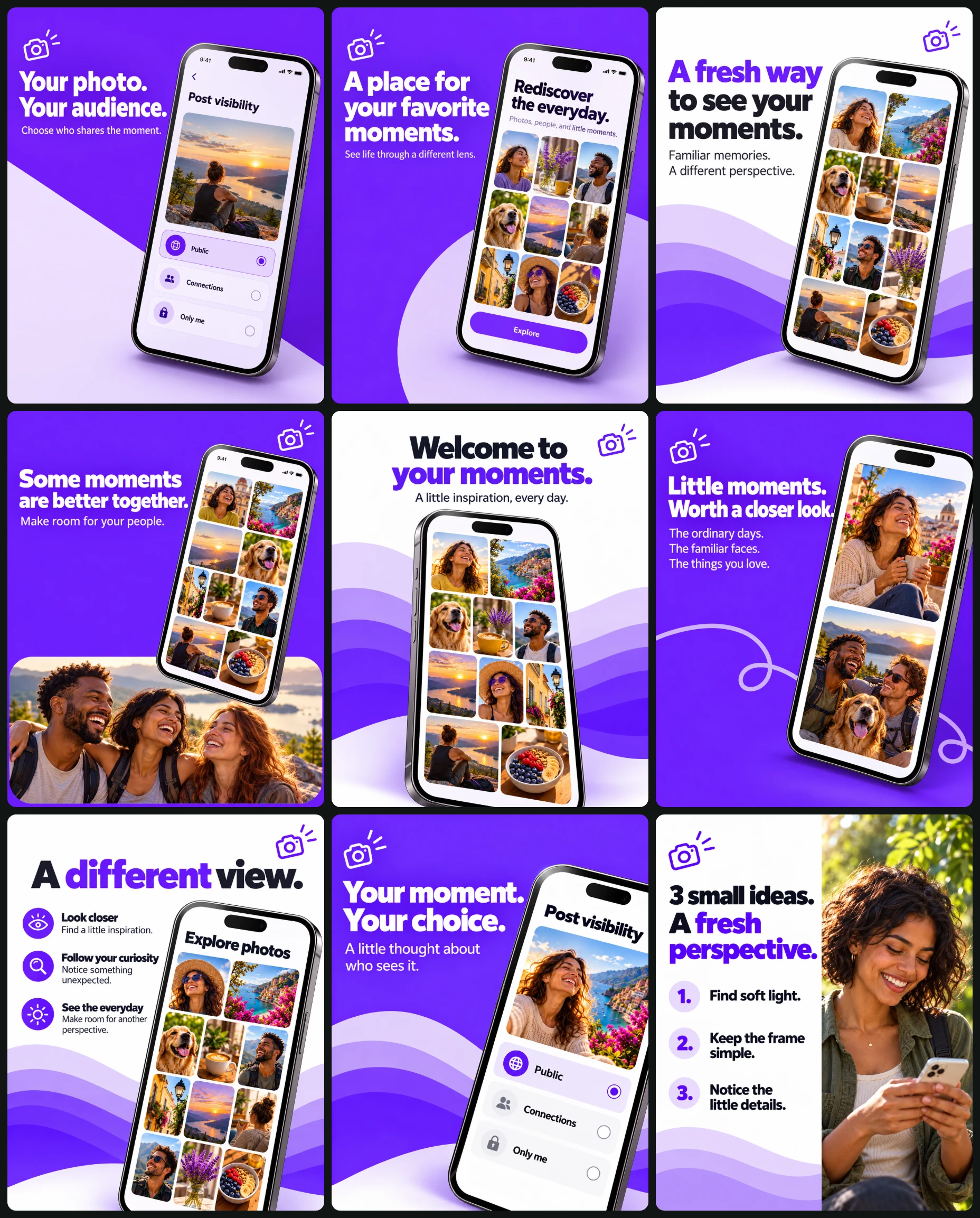
Create a coordinated nine-image photo-sharing app campaign using vivid violet, clean white layouts, oversized smartphones, rounded photo grids, and warm everyday photography.
OPTIONAL CAMPAIGN INPUTS
• App screenshots: [Optional]
• Confirmed features and interface-update details: [Optional]
• Personal or group photographs: [Optional; identify the intended design]
• Approved replacement copy or photo tips: [Optional]
• Approved campaign image: [Optional]
• Artwork language: [English by default]
AUTOMATIC CONTENT RULES
Treat blank fields and unchanged placeholders as absent.
Use supplied screenshots as interface references, preserving recognizable structure while removing brands, logos, usernames, personal information, account identifiers, websites, and unsupported claims.
Do not invent real app features, pricing, free access, download availability, ratings, user counts, storage capabilities, security guarantees, privacy controls, or redesign announcements.
Without screenshots, create clearly fictional concept interfaces:
• Designs 1 and 8: a “Post visibility” screen with “Public,” “Connections,” and “Only me.”
• Designs 2 and 5: a home screen with rounded image tiles.
• Designs 3, 4, and 6: simple photo galleries or feeds.
• Design 7: a discovery screen with “Explore photos” and an image grid.
These are fictional visual defaults, not claims about an existing app.
For a supplied app with unconfirmed audience controls, use the alternative photo-preview screen and copy specified for designs 1 and 8.
Use original photographs featuring varied adults, places, and everyday objects when screen content is not supplied. Avoid dense pseudo-text.
IDENTITY HANDLING
Preserve every supplied person’s recognizable facial features, skin tone, age, hairstyle, and defining characteristics. Preserve all identities in group photographs and do not duplicate a person to fill missing roles.
Without identity photographs:
• Design 4 uses three distinct original adult friends.
• Design 9 uses an original adult woman with curly dark hair.
• Interface thumbnails show varied original adults rather than repeatedly using one face.
GLOBAL PALETTE
• Violet #7020F5
• Deep violet #5712C9
• Lavender #B88AF7
• Pale lilac #E5D2FC
• White #FFFFFF
• Charcoal #17151B
A few yellow accent tiles may appear inside the fictional home-screen interface.
TYPOGRAPHY
Use one consistent geometric sans-serif family. Headlines are bold, compact, and tightly led. Supporting lines use a smaller regular weight.
Use white type on violet backgrounds and charcoal with selective violet emphasis on white backgrounds. Maintain approximately 7% safe margins.
GRAPHIC SYSTEM
Repeat layered lilac waves, rounded rectangular backdrops, restrained curved lines, and one small unbranded camera motif per poster.
Do not create a wordmark or repeat a camera icon as an app logo inside the interface. The camera motif is decorative.
No websites, footer bars, app-store badges, social icons, QR codes, or CTA buttons. The “Explore” control in design 2 belongs only to its fictional interface.
LIGHTING AND FINISH
Use soft upper-left light, realistic phone bezels, coherent glass reflections, readable screens, natural hands, and clear portrait photography.
Keep devices sharp and use photographic background softness only where appropriate. Maintain crisp vector-style waves and clean typography.
CONSISTENCY WORKFLOW
Generate design 1 first. Use its approved violet, phone materials, typography, margins, and finish as references.
Continue using original supplied screenshots for interface identity. Reuse approved fictional interfaces where relevant rather than redesigning them between panels.
Use design 3 to establish the layered-wave treatment repeated in designs 5 and 7. Keep camera-motif proportions, wave colors, type character, and device construction consistent.
The final three briefs complete the visible themes of partially cropped reference panels. Treat them as complete intentional advertisements.
NUMBERED DESIGN BRIEFS
1. CHOOSE YOUR AUDIENCE
Use a violet background with a large white diagonal wedge rising from lower left. Place an oversized smartphone on the right, tilted clockwise, showing a supplied or fictional visibility screen.
Upper-left headline:
“Your photo.
Your audience.”
Supporting line:
“Choose who shares the moment.”
If audience controls are unconfirmed for a supplied app, use a photo-preview screen and:
“Your photo.
Your moment.”
“Make space for what matters.”
Use white bold typography, a small camera motif, realistic phone reflections, and no additional promotional information.
2. A PLACE FOR YOUR PHOTOS
Use a violet background. Place one large upright smartphone on the right, almost frontal with a subtle clockwise tilt.
Use a supplied screenshot or fictional home screen with nine rounded photo tiles, an introduction, and an “Explore” pill control.
Fictional screen copy:
“Rediscover the everyday.”
“Photos, people, and little moments.”
Left headline:
“A place for
your favorite
moments.”
Lower-left supporting line:
“See life through a different lens.”
Use white type. Add a broad translucent lavender circle entering from lower right and a small white camera motif near upper left.
3. A FRESH PERSPECTIVE
Use a white background. Place a large smartphone in the lower-right two-thirds, tilted clockwise, showing a simple gallery.
Layer pale-lilac, lavender, and violet waves across the bottom, behind the phone.
Upper-left headline:
“A fresh way
to see your
moments.”
Set “fresh way” in violet and the remaining words in charcoal.
Supporting line:
“Familiar memories.
A different perspective.”
Place a small violet camera motif at upper right. Do not claim a redesign unless confirmed.
4. BETTER WITH YOUR PEOPLE
Use a violet background. Place a wide rounded-corner photograph of three adult friends laughing together across the lower third.
Float a large clockwise-tilted smartphone above it, overlapping the photograph’s upper border. Show a supplied or fictional photo feed.
Upper-left headline:
“Some moments
are better together.”
Supporting line:
“Make room for your people.”
Use white type and a small white camera motif at upper right. Preserve natural group anatomy and distinct identities. Do not invent invitation or private-circle features.
5. WELCOME TO YOUR MOMENTS
Use a white background. Center the headline across the upper quarter:
“Welcome to
your moments.”
Set the first line in charcoal and the second in violet.
Supporting line:
“A little inspiration, every day.”
Place a very large upright smartphone centrally, rising from the bottom edge and beginning near the middle. Show a supplied screenshot or a rounded grid of varied portraits, places, and objects, with restrained violet and yellow tiles.
Layer pale-lilac, lavender, and violet waves behind the phone. Add a violet camera motif at upper right. Do not claim a launch or interface update unless confirmed.
6. KEEP THE LITTLE MOMENTS
Use a violet background. Place an enormous smartphone on the right, tilted counterclockwise and naturally cropped by the right edge. Show two stacked photo-feed cards.
Left headline:
“Little moments.
Worth a closer look.”
Supporting copy:
“The ordinary days.
The familiar faces.
The things you love.”
Use white type, a thin lavender looping line near lower right, and a white camera motif at upper left. Do not invent storage, backup, or sharing capabilities.
7. DISCOVER A DIFFERENT VIEW
Use a white background. Center this headline at top:
“A different view.”
Set “different” in violet and the remaining words in charcoal.
Arrange three callouts down the left, each with a small violet circular symbol:
“Look closer”
“Find a little inspiration.”
“Follow your curiosity”
“Notice something unexpected.”
“See the everyday”
“Make room for another perspective.”
Place a large clockwise-tilted smartphone across lower right, cropped at the bottom, showing a supplied or fictional discovery screen. Add a pale-lilac curve behind it. Do not label these as new features unless confirmed.
8. YOUR MOMENT, YOUR CHOICE
Use a violet background with a broad pale-lilac curve entering from lower right.
Position an enlarged smartphone on the right, tilted slightly clockwise, its lower edge cropped. Show the supplied or fictional visibility screen.
Left headline:
“Your moment.
Your choice.”
Supporting line:
“A little thought about who sees it.”
If audience controls are unconfirmed for a supplied app, use a photo-preview screen and:
“Your moment.
Your perspective.”
“See the everyday your way.”
Add a small white camera motif at upper left. Keep the screen more prominent than in design 1.
9. THREE SMALL PHOTO IDEAS
Divide the canvas vertically: approximately 58% white editorial panel on the left and 42% full-height lifestyle photograph on the right.
Show the adult woman beneath foliage, looking down at a phone held naturally. Use warm skin tones and a softly separated green background.
At upper left, add a violet camera motif.
Headline:
“3 small ideas.
A fresh perspective.”
Set “fresh perspective” in violet and the rest in charcoal.
Tips:
“1. Find soft light.”
“2. Keep the frame simple.”
“3. Notice the little details.”
Use generous spacing and a restrained pale-lilac curve at the bottom of the text panel.
FINAL OUTPUT REQUIREMENTS
Generate 9 separate finished images, one per numbered brief. Each image must have its own complete canvas. Do not combine them into a collage, grid, contact sheet, or multi-panel image.
Use 4:5 portrait canvases throughout.
If generation requires individual calls, generate sequentially using the same approved campaign references, original screenshots, and supplied photographs.
Preserve all numbered compositions, exact copy, conditional feature rules, colors, and graphic treatments. Exclude contact-sheet gutters, cropped presentation boundaries, reference branding, websites, store badges, and unsupported claims.
Check readable interface text, natural hands, preserved identities, coherent phone perspective, and consistent typography before completing each image.
All 9 images in this set
Each image has its own prompt. Tap an image to see it bigger.
Create a photo-sharing app advertisement explaining post visibility through a large angled smartphone and concise editorial copy. Output one complete 4:5 portrait image.
OPTIONAL INPUTS
• App screenshot: [Optional]
• Confirmed feature details: [Optional]
• Approved campaign image: [Optional]
AUTOMATIC CONTENT RULES
Use a supplied screenshot as the interface reference, preserving its recognizable structure while removing branding, private information, usernames, websites, and unsupported claims. Otherwise create a clearly fictional photo-app settings screen titled “Post visibility,” with options “Public,” “Connections,” and “Only me.” These are concept-interface defaults, not claims about an existing app.
If supplied details do not confirm audience controls, replace the settings screen with a simple photo preview and use the alternative copy below. Treat blank fields as absent. No invented pricing, availability, ratings, download counts, or performance claims.
COMPOSITION
Use a vivid violet background with a large white diagonal wedge rising from the lower-left edge. Place an oversized smartphone on the right, tilted clockwise, its screen facing camera. Keep the device within the canvas and its interface readable.
Place the headline at upper left and supporting copy below. Use a small violet-and-white camera symbol as an unbranded decorative motif.
TYPOGRAPHY AND EXACT COPY
Default headline:
“Your photo.
Your audience.”
Supporting line:
“Choose who shares the moment.”
If audience controls are not confirmed for a supplied app:
“Your photo.
Your moment.”
“Make space for what matters.”
Use bold geometric sans-serif for the headline and smaller regular sans-serif for supporting text.
CAMPAIGN SYSTEM
Violet #7020F5, deep violet #5712C9, lavender #B88AF7, pale lilac #E5D2FC, white #FFFFFF, charcoal #17151B. Maintain 7% margins. No website, store badge, CTA button, or footer.
FINISH
Soft upper-left light, realistic phone thickness and glass, coherent shadow, crisp typography, and minimal interface clutter.
OUTPUT
One standalone 4:5 advertisement. No branding, invented feature claims, extra devices, or contact-sheet framing.
Violet Phone, Favorite Moments
Create a vibrant photo-sharing app advertisement pairing a bold headline with a large upright smartphone. Output one complete 4:5 portrait image.
OPTIONAL INPUTS
• App screenshot: [Optional]
• Confirmed app details: [Optional]
• Approved campaign image: [Optional]
AUTOMATIC RULES
Preserve a supplied screenshot’s recognizable layout while removing brands, usernames, private information, websites, and unsupported claims. Otherwise create a fictional photo-app home screen with a three-by-three arrangement of rounded photo thumbnails, a short editorial introduction, and one violet pill-shaped control labeled “Explore.”
Use original everyday photographs featuring varied adults, places, and objects. Do not invent free access, all-in-one functionality, download availability, ratings, or app capabilities. Blank fields are absent.
COMPOSITION
Use a vivid violet background. Position one large upright smartphone in the right half, almost frontal, with a subtle clockwise tilt. Keep the entire phone visible.
At left, place the headline in the upper-middle area and a small editorial line near the lower-left corner. Add a broad translucent lavender circular shape entering from the lower-right edge. Place one small white camera motif near upper left.
TYPOGRAPHY AND EXACT COPY
Headline:
“A place for
your favorite
moments.”
Lower-left line:
“See life through a different lens.”
Use bold white geometric sans-serif for the headline and smaller regular white type for the supporting line.
Inside the fictional screen, use:
“Rediscover the everyday.”
“Photos, people, and little moments.”
CAMPAIGN SYSTEM
Violet #7020F5, deep violet #5712C9, lavender #B88AF7, pale lilac #E5D2FC, white #FFFFFF, charcoal #17151B. Maintain 7% margins. No app-store badges, CTA button, logo, website, or footer.
FINISH
Soft upper-left light, clear screen geometry, realistic bezel and glass, restrained shadows, and readable thumbnails.
OUTPUT
One separate finished 4:5 advertisement. No invented pricing, branded interface, dense pseudo-text, or grid borders.
Fresh moments on a tilted violet smartphone
Create a clean photo-app advertisement featuring a tilted smartphone above layered violet waves. Output one complete 4:5 portrait image.
OPTIONAL INPUTS
• App screenshot: [Optional]
• Confirmed interface-update details: [Optional]
• Approved campaign image: [Optional]
AUTOMATIC RULES
Use supplied screenshots faithfully as interface references while removing branding, private information, usernames, websites, and unsupported claims. Otherwise create a fictional photo-gallery screen with six original lifestyle images and minimal neutral controls.
Do not claim an app redesign, improved performance, or retained features unless confirmed. Blank inputs are absent.
COMPOSITION
Use a white background. Position a large smartphone in the lower-right two-thirds, tilted clockwise, showing a simple photo gallery. Keep the screen readable and the device edges coherent.
Build three flowing waves across the bottom: pale lilac behind, lavender in the middle, vivid violet in front. Let the phone overlap the waves. Keep the upper-left half open for typography.
Place a small violet camera motif at upper right.
TYPOGRAPHY AND EXACT COPY
Headline:
“A fresh way
to see your
moments.”
Use bold geometric sans-serif. Set most words in charcoal and “fresh way” in violet.
Supporting line below:
“Familiar memories.
A different perspective.”
Use smaller charcoal sans-serif. If an actual redesign is confirmed, approved update copy may replace these lines.
CAMPAIGN SYSTEM
Violet #7020F5, deep violet #5712C9, lavender #B88AF7, pale lilac #E5D2FC, white #FFFFFF, charcoal #17151B. Use 7% margins. No CTA, footer, website, or store badges.
FINISH
Soft upper-left light, restrained phone shadow, crisp wave edges, realistic glass, and clear original thumbnails.
OUTPUT
One standalone 4:5 advertisement. No invented update claims, logos, extra phones, or presentation borders.
Shared moments, better together
Create a photo-sharing app advertisement combining a floating smartphone with a warm photograph of friends. Output one complete 4:5 portrait image.
OPTIONAL INPUTS
• App screenshot: [Optional]
• Personal or group photograph: [Optional]
• Confirmed invitation features: [Optional]
• Approved campaign image: [Optional]
AUTOMATIC IDENTITY AND CONTENT RULES
Preserve every supplied person’s recognizable identity, skin tone, age, hairstyle, and defining characteristics. Never duplicate a person to fill a group. Otherwise create three distinct original adult friends sharing a candid laugh.
Preserve a supplied app screenshot’s layout while removing branding, private information, usernames, and unsupported claims. Otherwise use a fictional photo feed with original thumbnails. Do not imply invitations or private circles are supported unless confirmed. Blank fields are absent.
COMPOSITION
Use a vivid violet background. Place a wide rounded-corner friendship photograph across the lower third. Show three adults seated close together in soft daylight, laughing naturally, with distinct faces and coherent hands.
Float a large smartphone diagonally above the photograph, its lower edge overlapping the photo’s upper border. Tilt it clockwise and show a photo feed. Keep the device away from the main headline.
TYPOGRAPHY AND EXACT COPY
Upper left:
“Some moments
are better together.”
Supporting line:
“Make room for your people.”
Use bold white geometric sans-serif and smaller white supporting type. Place a small white camera motif at upper right.
CAMPAIGN SYSTEM
Violet #7020F5, deep violet #5712C9, lavender #B88AF7, pale lilac #E5D2FC, white #FFFFFF, charcoal #17151B. Maintain 7% margins. No CTA, website, footer, or store badges.
FINISH
Soft upper-left light, natural skin, realistic phone reflections, rounded photo corners, and clear visual layering.
OUTPUT
One separate 4:5 advertisement. No fabricated invitation claim, duplicated faces, extra limbs, branding, or grid framing.
Violet phone, everyday moments
Create a photo-app introduction poster with centered typography and a large smartphone rising from the bottom edge. Output one complete 4:5 portrait image.
OPTIONAL INPUTS
• App screenshot: [Optional]
• Confirmed introduction or update copy: [Optional]
• Approved campaign image: [Optional]
AUTOMATIC RULES
Preserve a supplied screenshot’s recognizable layout while removing branding, private information, usernames, websites, and unsupported claims. Otherwise create a fictional home screen containing a three-by-three grid of rounded photo tiles showing varied original adult portraits, travel scenes, and everyday objects.
Do not claim a new release or redesigned interface unless confirmed. Treat blank fields as absent.
COMPOSITION
Use a white background. Center the headline across the upper quarter, with a small supporting line beneath it.
Place a very large upright smartphone centrally, beginning near the middle and extending beyond the bottom edge. Keep the top bezel and upper screen visible. Its screen contains evenly spaced rounded image tiles with restrained violet and yellow accent tiles.
Layer pale-lilac, lavender, and violet waves behind the phone across the lower third. Place a small violet camera motif at upper right.
TYPOGRAPHY AND EXACT COPY
Centered headline:
“Welcome to
your moments.”
Set the first line in bold charcoal and the second in bold violet geometric sans-serif.
Supporting line:
“A little inspiration, every day.”
CAMPAIGN SYSTEM
Violet #7020F5, deep violet #5712C9, lavender #B88AF7, pale lilac #E5D2FC, white #FFFFFF, charcoal #17151B. Use 7% text margins. No CTA, footer, website, or download badge.
FINISH
Soft upper-left light, symmetrical screen construction, realistic glass, sharp thumbnail borders, and crisp typography.
OUTPUT
One standalone finished 4:5 advertisement. No unsupported launch claim, brand marks, dense interface text, or presentation borders.
Violet smartphone showcasing everyday moments
Create a photo-sharing app advertisement featuring an oversized cropped smartphone and a warm message about everyday memories. Output one complete 4:5 portrait image.
OPTIONAL INPUTS
• App screenshot: [Optional]
• Personal photographs for screen content: [Optional]
• Confirmed app features: [Optional]
• Approved campaign image: [Optional]
AUTOMATIC RULES
Preserve supplied photo identities and defining features. Use supplied screenshots as layout references while removing brands, private information, usernames, websites, and unsupported claims.
Without screenshots, create a fictional photo feed using original everyday photographs of varied adults and places, with minimal neutral controls. Do not invent storage, sharing, backup, or privacy capabilities. Blank fields are absent.
COMPOSITION
Use a vivid violet background. Place an enormous smartphone on the right, tilted counterclockwise, with its top near the upper edge and its right side naturally cropped by the canvas.
Show two stacked photo-feed cards. Keep the device’s screen perspective coherent and recognizable.
Place the headline on the left around the upper-middle area. Below it, add a short supporting paragraph. Use a thin lavender looping line as a restrained background accent near lower right. Place one white camera motif at upper left.
TYPOGRAPHY AND EXACT COPY
Headline:
“Little moments.
Worth a closer look.”
Supporting copy:
“The ordinary days.
The familiar faces.
The things you love.”
Use bold white geometric sans-serif for the headline and smaller regular white text below.
CAMPAIGN SYSTEM
Violet #7020F5, deep violet #5712C9, lavender #B88AF7, pale lilac #E5D2FC, white #FFFFFF, charcoal #17151B. Maintain 7% text margins. No footer, CTA, website, or badges.
FINISH
Soft upper-left light, clear screen imagery, realistic bezel thickness, and restrained reflections.
OUTPUT
One separate finished 4:5 advertisement. No unsupported app claims, distorted faces, logos, or contact-sheet framing.
Explore a different view
Create a feature-style photo-app advertisement using an angled smartphone and three concise editorial callouts. Output one complete 4:5 portrait image.
OPTIONAL INPUTS
• App screenshot: [Optional]
• Confirmed feature names and descriptions: [Optional]
• Approved campaign image: [Optional]
AUTOMATIC RULES
Preserve supplied interface layout while removing branding, private data, usernames, websites, and unsupported claims. Otherwise create a fictional search-and-discovery screen with a search field labeled “Explore photos” and a simple image grid.
Use confirmed feature names when supplied. Without confirmation, use the neutral editorial labels below; do not present invented capabilities as real features. Blank fields are absent.
COMPOSITION
Use a white background. Center a compact headline at top. Arrange three short callouts down the left side, each with a small violet circular symbol.
Place a large smartphone diagonally across the lower-right area, tilted clockwise and partially cropped at the bottom. Show a clean discovery-style interface. Add a pale-lilac curved shape behind the phone.
TYPOGRAPHY AND EXACT COPY
Top headline:
“A different view.”
Set “different” in violet and the remaining words in charcoal, using bold geometric sans-serif.
Left callouts:
“Look closer”
“Find a little inspiration.”
“Follow your curiosity”
“Notice something unexpected.”
“See the everyday”
“Make room for another perspective.”
Use bold violet labels and small charcoal supporting lines. Do not add a “New features” claim unless confirmed.
CAMPAIGN SYSTEM
Violet #7020F5, deep violet #5712C9, lavender #B88AF7, pale lilac #E5D2FC, white #FFFFFF, charcoal #17151B. Maintain 7% margins. No CTA, footer, website, or store badges.
FINISH
Crisp editorial layout, realistic phone perspective, soft upper-left shadow, and readable typography.
OUTPUT
One standalone 4:5 advertisement. No fabricated features, extra callouts, brands, or grid borders.
Your moment, your choice
Create a second photo-app visibility advertisement using an enlarged smartphone against a vivid violet background. Output one complete 4:5 portrait image.
OPTIONAL INPUTS
• App screenshot: [Optional]
• Confirmed audience-control details: [Optional]
• Approved campaign image: [Optional]
AUTOMATIC RULES
Preserve a supplied screenshot’s recognizable layout while removing brands, private information, usernames, websites, and unsupported claims.
Without a screenshot, use a fictional “Post visibility” concept screen containing “Public,” “Connections,” and “Only me.” If a supplied app does not have confirmed audience controls, show a photo-preview screen and use the alternative copy below. Do not invent real app capabilities, pricing, or availability. Blank fields are absent.
COMPOSITION
Use a vivid violet background with a broad pale-lilac curved shape entering from lower right. Position an oversized smartphone in the right half, tilted slightly clockwise, with its lower edge cropped naturally.
Compared with a wider visibility poster, bring the phone closer and make the screen more prominent. Keep the left half available for a large headline and one short supporting line.
Place a small white camera motif at upper left.
TYPOGRAPHY AND EXACT COPY
Default:
“Your moment.
Your choice.”
Supporting line:
“A little thought about who sees it.”
If audience controls are unconfirmed for a supplied app:
“Your moment.
Your perspective.”
Supporting line:
“See the everyday your way.”
Use bold white geometric sans-serif, tightly led, with smaller regular supporting text.
CAMPAIGN SYSTEM
Violet #7020F5, deep violet #5712C9, lavender #B88AF7, pale lilac #E5D2FC, white #FFFFFF, charcoal #17151B. Maintain 7% text margins. No CTA, footer, store badges, or website.
FINISH
Soft upper-left light, realistic device geometry, clear screen type, and controlled reflections.
OUTPUT
One separate finished 4:5 advertisement. No unsupported feature claims, branding, unreadable settings, or presentation borders.
Fresh perspective in soft light
Create an editorial photo-tips advertisement combining a white text panel with a warm lifestyle portrait. Output one complete 4:5 portrait image.
OPTIONAL INPUTS
• Personal photograph: [Optional]
• Approved photo tips: [Optional]
• Approved campaign image: [Optional]
AUTOMATIC IDENTITY RULES
Preserve a supplied person’s recognizable facial features, skin tone, age, hairstyle, and defining characteristics. Otherwise create an original adult woman with curly dark hair in a relaxed outdoor setting. Do not reuse an unrelated campaign face automatically.
Use the default tips below unless replacements are supplied. No app-feature claims, logos, websites, private information, or invented performance results. Blank fields are absent.
COMPOSITION
Divide the canvas vertically: approximately 58% white editorial panel on the left and 42% full-height lifestyle photograph on the right.
Show the woman in soft daylight beneath foliage, looking down at an unbranded phone held naturally. Use warm skin tones and a softly separated green background.
Place a small violet camera motif at the upper-left corner. Set the headline below it, followed by three clearly spaced numbered tips. Add a restrained pale-lilac curve at the bottom of the text panel.
TYPOGRAPHY AND EXACT COPY
Headline:
“3 small ideas.
A fresh perspective.”
Tips:
“1. Find soft light.”
“2. Keep the frame simple.”
“3. Notice the little details.”
Use bold charcoal geometric sans-serif, with “fresh perspective” in violet. Set tips in medium-weight charcoal sans-serif.
CAMPAIGN SYSTEM
Violet #7020F5, deep violet #5712C9, lavender #B88AF7, pale lilac #E5D2FC, white #FFFFFF, charcoal #17151B. Maintain generous text-panel padding. No CTA, footer, website, or badges.
FINISH
Natural portrait texture, coherent hands, clean editorial spacing, and readable type.
OUTPUT
One standalone finished 4:5 advertisement. No distorted fingers, extra text, branding, or contact-sheet framing.