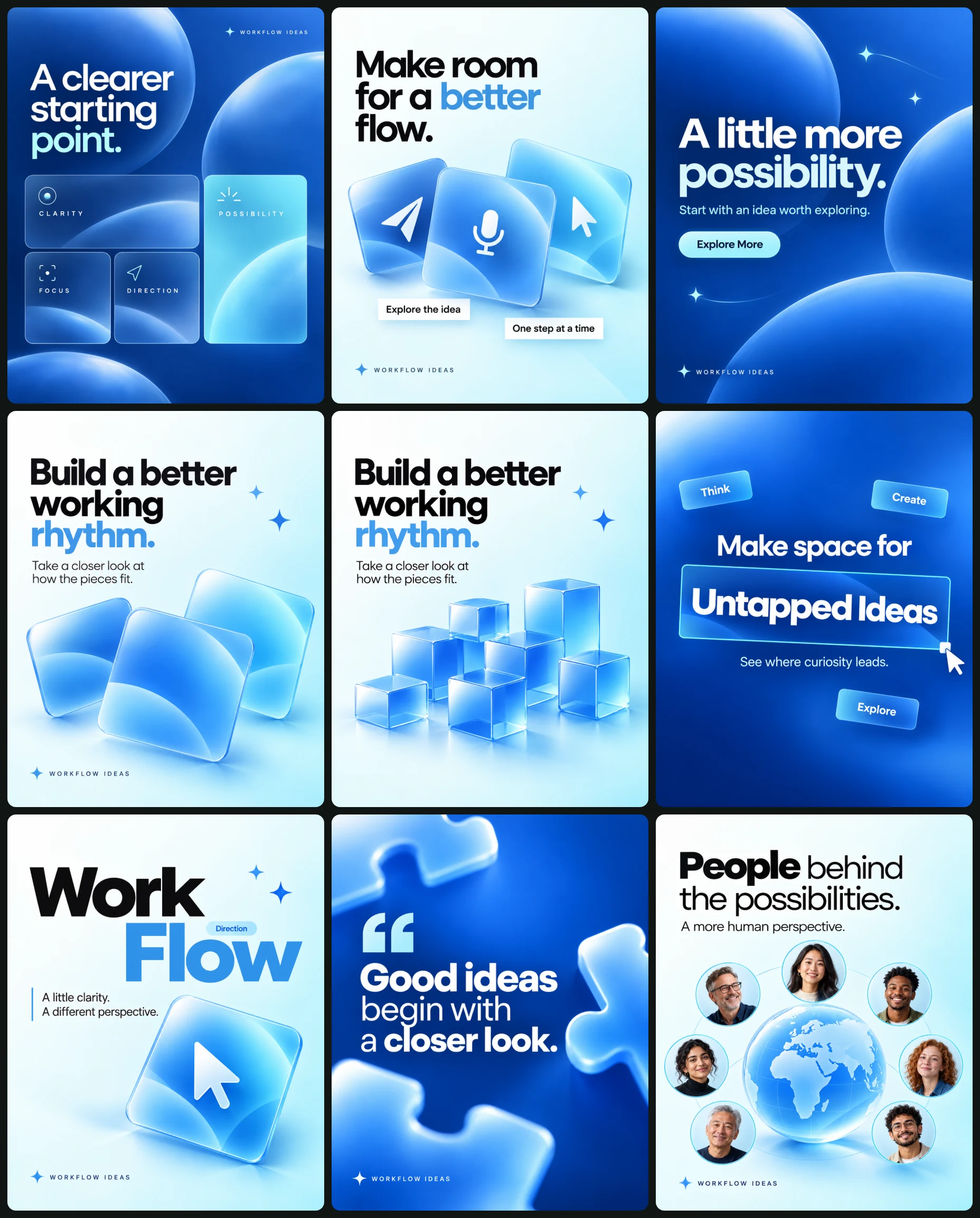
Campaign set · 10 images
Blue 3D Instagram Carousel for SaaS Brands
Instagram Post Sets
Way 2 · only some AI modelsThe whole set at onceOne master prompt that makes every design together.
Master prompt
Use this only if your AI model can make many images together in one go (multi-image generation). If it makes one image at a time, the result will not match. Use the separate prompts below instead.
Create a coordinated nine-image technology-themed campaign combining blue gradients, near-white backgrounds, clean geometric typography, pale-cyan interface elements, and restrained dimensional graphics.
OPTIONAL CAMPAIGN INPUTS
• Confirmed services and strengths: [Optional]
• Verified statistics: [Optional]
• Approved replacement headlines and CTAs: [Optional]
• Personal photographs for design 8: [Optional]
• Confirmed quotation and attribution for design 7: [Optional]
• Approved campaign image: [Optional]
• Artwork language: [English by default]
CONTENT RULES
Treat blank fields and unchanged placeholders as absent.
Use supplied facts exactly. Do not copy reference statistics or invent years of experience, project counts, customer numbers, success rates, financial returns, AI capabilities, integrations, service availability, or performance guarantees.
Default copy presents ideas and possibilities rather than unverified commercial promises.
Do not add brand names, logos, websites, social handles, certification marks, watermarks, or designer credits.
For design 7, the default quotation is an original editorial statement, not a testimonial or attributed endorsement.
For design 8, supplied or fictional portraits are illustrative people, not asserted users, customers, employees, or endorsers. Preserve supplied identities and do not duplicate faces.
GLOBAL PALETTE
• Navy #10366F
• Blue #2362C7
• Sky blue #3E9DDF
• Pale cyan #B8F2FA
• Near-white #F5FCFF
• Charcoal #111820
TYPOGRAPHY
Use one clean geometric sans-serif family throughout. Combine regular-weight introductory phrases with bold emphasis.
Use white and cyan on blue canvases, charcoal and sky blue on near-white canvases. Maintain approximately 8% safe margins and consistent small category labels.
The recurring category label is:
“WORKFLOW IDEAS”
This is editorial text, not a brand logo.
GRAPHIC AND MATERIAL SYSTEM
Repeat rounded cards, satin acrylic tiles, lightly frosted spheres, thin outlines, restrained four-point sparkles, and simple original pointer arrows.
Use one broad upper-left light direction for dimensional objects. Keep highlights broad, shadows soft, and material thickness modest.
Typography, vector icons, and interface outlines remain crisp. Softness belongs to highlights, shadows, transparency, and deliberately foreground objects—not to the entire design.
Do not add photographic grain, dust, haze, paper distress, neon outlines, heavy bloom, sharp caustics, excessive bevels, or unrelated decorative effects.
CTA SYSTEM
Design 3 has one pale-cyan pill reading “Explore More,” with dark text, generous padding, and a very soft shadow.
Design 2 contains two editorial labels, not CTA buttons.
Design 9 contains a conceptual search field, not a functioning interface.
Do not add CTAs elsewhere unless approved replacements are supplied.
CONSISTENCY WORKFLOW
Generate design 1 first. Use its approved blues, typography, margins, rounded corners, and light direction as references.
Use design 2 to establish the near-white backgrounds and satin tile materials. Match them in designs 4, 6, and 8.
Keep category-label size, sparkle construction, border weights, pointer styling, and material highlights consistent. Preserve composition variety rather than repeating one layout.
NUMBERED DESIGN BRIEFS
1. A CLEARER STARTING POINT
Use a navy-to-blue gradient with three translucent blue spheres cropped at the edges.
Place the category label near upper right:
“WORKFLOW IDEAS”
Upper-left headline:
“A clearer
starting
point.”
Set “point.” in pale cyan and the rest in white.
Below, arrange four rounded cards: one wide card, two smaller cards below it, and one taller cyan card at right.
Default labels:
“CLARITY”
“FOCUS”
“DIRECTION”
“POSSIBILITY”
Use verified supplied statistics instead only when available. Do not invent numbers.
2. MAKE ROOM FOR FLOW
Use a near-white background fading to pale cyan.
Upper headline:
“Make room
for a better
flow.”
Use charcoal with “better” in sky blue.
Below, fan three blue satin acrylic tiles with original white paper-plane, microphone, and pointer symbols. They are conceptual icons, not confirmed features.
Add two offset white labels:
“Explore the idea”
“One step at a time”
Lower category:
“WORKFLOW IDEAS”
3. A LITTLE MORE POSSIBILITY
Use a navy-to-blue gradient.
Centered headline:
“A little more
possibility.”
Set the first line bold and second lighter and slightly larger.
Supporting line:
“Start with an idea worth exploring.”
Pale-cyan CTA pill:
“Explore More”
Add three restrained cyan four-point sparkles with short trails on two. Lower category:
“WORKFLOW IDEAS”
4. BUILD A BETTER RHYTHM
Use a near-white-to-cyan background.
Upper-left headline:
“Build a better
working
rhythm.”
Use charcoal with “rhythm.” in sky blue.
Supporting copy:
“Take a closer look at
how the pieces fit.”
Build an irregular arrangement of translucent blue square blocks across the lower third. These are abstract shapes, not a data chart. Add two small blue sparkles near the headline.
Lower-left category:
“WORKFLOW IDEAS”
5. UNTAPPED IDEAS
Use a navy-to-blue gradient.
Above the central box:
“Make space for”
Inside a thin cyan selection rectangle:
“Untapped Ideas”
Below:
“See where curiosity leads.”
Rotate the selection box approximately two degrees counterclockwise. Add a square handle at lower right with a white pointer touching it.
Place three small frosted-cyan tags around the composition:
“Think”
“Create”
“Explore”
Lower category:
“WORKFLOW IDEAS”
6. WORK / FLOW
Use a near-white-to-cyan background.
Set a staggered oversized headline:
“Work”
“Flow”
Use charcoal for the first word and sky blue for the second.
Between the words, place tiny blue pills:
“Ideas”
“Direction”
Add a small pointer, two blue sparkles, and a thin vertical blue rule beside:
“A little clarity.
A different perspective.”
Place a shallow blue arrow tile at bottom right.
Lower-left category:
“WORKFLOW IDEAS”
7. A THOUGHT WORTH KEEPING
Use bright blue fading to navy.
Set a large opening quotation mark beside:
“Good ideas
begin with
a closer look.”
Use white text with “Good ideas” and “closer look” bold.
Crop oversized pale-blue puzzle pieces into the upper-left, middle-right, and lower-left edges. These foreground props are softly defocused; the text stays crisp.
Lower category:
“WORKFLOW IDEAS”
Do not invent attribution or present the statement as a testimonial.
8. PEOPLE BEHIND THE POSSIBILITIES
Use a near-white-to-cyan background.
Upper headline:
“People behind
the possibilities.”
Make “People” bold.
Supporting line:
“A more human perspective.”
Place a pale-blue satin-glass globe in the lower-middle canvas with coherent simplified continents and a soft elliptical shadow beneath.
Arrange seven distinct circular adult portraits around it with thin cyan borders. Use varied original adults or preserve supplied identities. Do not imply customer status or user counts.
Lower category:
“WORKFLOW IDEAS”
9. START WITH A QUESTION
Use a navy-to-blue gradient.
Upper category:
“WORKFLOW IDEAS”
Centered headline:
“Every good idea
starts with
a question.”
Make “a question.” bold and slightly larger.
Below, place a thin white rounded search-style field tilted slightly counterclockwise, reading:
“What could work better?”
Add a magnifying-glass symbol at right, a cyan pointer at the lower-left edge, and a restrained soft shadow beneath the field.
FINAL OUTPUT REQUIREMENTS
Generate 9 separate finished images, one per numbered brief. Each image must have its own complete canvas. Do not combine them into a collage, grid, contact sheet, or multi-panel image.
Use consistent 4:5 portrait canvases.
If generation requires individual calls, generate sequentially using the same approved campaign references.
Preserve all numbered compositions, exact copy, palette, material treatments, and conditional factual rules. Exclude reference-sheet gutters, outer presentation borders, branding, unsupported statistics, and invented claims.
Check typography, spacing, consistent icon geometry, restrained material depth, coherent globe geography, distinct portraits, and smooth gradients before completing each image.
All 10 images in this set
Each image has its own prompt. Tap an image to see it bigger.
Create a polished technology-services advertisement using a blue gradient, modular information cards, and restrained translucent spheres. Output one complete 4:5 portrait image.
OPTIONAL INPUTS
• Confirmed services or strengths: [Optional]
• Verified statistics: [Optional]
• Approved campaign image: [Optional]
CONTENT RULES
Use supplied facts exactly. Do not copy statistics from a composition reference or invent experience, project counts, success rates, client numbers, or financial results.
Without verified statistics, use the qualitative card labels below. Treat blank fields and unchanged placeholders as absent. No brand names, logos, websites, certifications, or fabricated claims.
COMPOSITION
Use a deep-navy upper-left background transitioning toward brighter blue at lower right.
Place a small editorial category label near the upper-right corner. Set the headline at upper left, followed by four rounded cards:
• One wide card beneath the headline.
• Two small cards side by side below it.
• One taller pale-cyan card to their right.
Use consistent corner radii, fine translucent borders, and restrained shadows. Add three large translucent blue spheres partially cropped at the edges, clear of the headline and cards.
TYPOGRAPHY AND EXACT COPY
Category label:
“WORKFLOW IDEAS”
Headline:
“A clearer
starting
point.”
Set the first two lines in white and “point.” in pale cyan.
Default card labels:
“CLARITY”
“FOCUS”
“DIRECTION”
“POSSIBILITY”
Use bold white lettering on blue cards and deep navy on the cyan card. If verified statistics are supplied, replace the labels with those exact figures and concise descriptions.
VISUAL SYSTEM
Navy #10366F, blue #2362C7, sky blue #3E9DDF, pale cyan #B8F2FA, near-white #F5FCFF, charcoal #111820.
Use a clean geometric sans-serif, approximately 8% margins, and generous line spacing. No CTA or footer.
MATERIAL AND LIGHTING
Treat spheres as lightly frosted glass with one broad upper-left highlight. Keep card shadows subtle and consistent. Typography and card boundaries remain crisp; only internal highlights have soft transitions.
OUTPUT
One finished 4:5 advertisement. No grain, haze, neon glow, excessive bevels, dense small text, watermarks, or presentation-grid borders.
Blue workflow tiles for better flow
Create a minimal automation-themed advertisement with three overlapping blue interface tiles on a pale background. Output one complete 4:5 portrait image.
OPTIONAL INPUTS
• Confirmed service details: [Optional]
• Approved copy: [Optional]
• Approved campaign image: [Optional]
CONTENT RULES
Use supplied service information accurately. Without details, present automation as a creative theme rather than promising specific capabilities or outcomes. Blank placeholders are absent. No invented statistics, guarantees, pricing, or availability.
COMPOSITION
Use a near-white background transitioning gently to pale cyan at the bottom.
Center a three-line headline in the upper quarter. Beneath it, arrange three softly rounded square tiles in a shallow fan: left tilted counterclockwise, middle nearly upright, right tilted clockwise.
Use simple original white symbols: a paper-plane shape, a microphone, and a pointer arrow. These are conceptual icons, not evidence of supported features.
Below the tiles, place two slim white rectangular labels, slightly offset and rotated in opposing directions.
TYPOGRAPHY AND EXACT COPY
Headline:
“Make room
for a better
flow.”
Use charcoal geometric sans-serif, with “better” in sky blue.
Small labels:
“Explore the idea”
“One step at a time”
At lower center:
“WORKFLOW IDEAS”
Use small bold charcoal capitals.
VISUAL SYSTEM
Navy #10366F, blue #2362C7, sky blue #3E9DDF, pale cyan #B8F2FA, near-white #F5FCFF, charcoal #111820. Maintain 8% margins and consistent rounded forms.
RENDERING
Give the tiles a satin acrylic appearance with restrained thickness, upper-left softbox reflections, and soft contact shadows where they overlap. Keep icons flat and sharp on their surfaces.
Use a near-frontal product-render perspective with minimal lens distortion. No unnecessary camera blur.
OUTPUT
One standalone 4:5 advertisement. No logos, CTA button, website, grain, glowing outlines, excessive reflections, or unsupported feature claims.
A little more possibility
Create a clean technology-themed advertisement centered on typography, a restrained pill-shaped CTA, and small four-point sparkles. Output one complete 4:5 portrait image.
OPTIONAL INPUTS
• Approved headline: [Optional]
• Confirmed service description: [Optional]
• Approved CTA: [Optional]
• Approved campaign image: [Optional]
CONTENT RULES
Treat blank fields as absent. Use the default creative copy below unless replacements are supplied. Do not promise that AI handles every task or invent supported services, results, or availability.
COMPOSITION
Use a smooth navy-to-blue gradient, darkest near upper left and brightest at lower right.
Center the main headline through the upper-middle canvas. Add three pale-cyan four-point sparkles around it: one at left, one near upper right, and one smaller below right. Use short fine horizontal trails on two sparkles.
Place one supporting line beneath the headline and a small pale-cyan pill below that.
TYPOGRAPHY AND EXACT COPY
Headline:
“A little more
possibility.”
Use white geometric sans-serif. Set the first line bold and the second line lighter and slightly larger.
Supporting line:
“Start with an idea worth exploring.”
CTA:
“Explore More”
Lower-center category:
“WORKFLOW IDEAS”
Keep the CTA compact, with dark text and generous internal padding.
VISUAL SYSTEM
Navy #10366F, blue #2362C7, sky blue #3E9DDF, pale cyan #B8F2FA, near-white #F5FCFF, charcoal #111820. Maintain 8% safe margins.
FINISH
Use crisp typography, smooth gradients without banding, and a very soft shadow beneath the CTA. Sparkles are flat graphic marks, not glowing stars.
OUTPUT
One finished 4:5 advertisement. No logo, website, fabricated claims, dust, grain, haze, excessive bloom, or presentation framing.
Build a better working rhythm
Create an editorial technology advertisement featuring oversized typography and translucent blue blocks forming an irregular rising rhythm. Output one complete 4:5 portrait image.
OPTIONAL INPUTS
• Confirmed service details: [Optional]
• Approved copy: [Optional]
• Approved campaign image: [Optional]
CONTENT RULES
Use supplied information accurately. Without details, use neutral creative copy and do not imply measured growth, performance improvements, or supported automation features. Blank inputs are absent.
COMPOSITION
Use a near-white upper background transitioning to pale cyan below.
Set the headline at upper left, with a compact supporting paragraph beneath. Fill the bottom third with rows of translucent blue square blocks stacked into an irregular stepped arrangement.
Keep the blocks lower at left, varied through the center, and tallest at right. They are abstract design elements, not a data chart. Do not add axes, values, percentages, or growth claims.
Add two small pale-blue sparkles beside the final headline line.
TYPOGRAPHY AND EXACT COPY
Headline:
“Build a better
working
rhythm.”
Use charcoal geometric sans-serif for the first two lines and sky blue for “rhythm.”
Supporting text:
“Take a closer look at
how the pieces fit.”
At lower left:
“WORKFLOW IDEAS”
Use small bold charcoal capitals.
VISUAL SYSTEM
Navy #10366F, blue #2362C7, sky blue #3E9DDF, pale cyan #B8F2FA, near-white #F5FCFF, charcoal #111820. Maintain 8% text margins.
MATERIAL AND LIGHT
Use softly frosted acrylic blocks with subtle overlapping transparency and broad upper-left illumination. Preserve clear square geometry. Avoid sharp caustics or impossible intersecting blocks.
OUTPUT
One separate finished 4:5 advertisement. No statistics, branding, CTA, grain, atmospheric effects, exaggerated reflections, or grid borders.
Stepped translucent blue block arrangement
Create an editorial technology advertisement featuring oversized typography and translucent blue blocks forming an irregular rising rhythm. Output one complete 4:5 portrait image.
OPTIONAL INPUTS
• Confirmed service details: [Optional]
• Approved copy: [Optional]
• Approved campaign image: [Optional]
CONTENT RULES
Use supplied information accurately. Without details, use neutral creative copy and do not imply measured growth, performance improvements, or supported automation features. Blank inputs are absent.
COMPOSITION
Use a near-white upper background transitioning to pale cyan below.
Set the headline at upper left, with a compact supporting paragraph beneath. Fill the bottom third with rows of translucent blue square blocks stacked into an irregular stepped arrangement.
Keep the blocks lower at left, varied through the center, and tallest at right. They are abstract design elements, not a data chart. Do not add axes, values, percentages, or growth claims.
Add two small pale-blue sparkles beside the final headline line.
TYPOGRAPHY AND EXACT COPY
Headline:
“Build a better
working
rhythm.”
Use charcoal geometric sans-serif for the first two lines and sky blue for “rhythm.”
Supporting text:
“Take a closer look at
how the pieces fit.”
At lower left:
“WORKFLOW IDEAS”
Use small bold charcoal capitals.
VISUAL SYSTEM
Navy #10366F, blue #2362C7, sky blue #3E9DDF, pale cyan #B8F2FA, near-white #F5FCFF, charcoal #111820. Maintain 8% text margins.
MATERIAL AND LIGHT
Use softly frosted acrylic blocks with subtle overlapping transparency and broad upper-left illumination. Preserve clear square geometry. Avoid sharp caustics or impossible intersecting blocks.
OUTPUT
One separate finished 4:5 advertisement. No statistics, branding, CTA, grain, atmospheric effects, exaggerated reflections, or grid borders.
Untapped Ideas, Framed in Blue
Create a blue technology poster using a large selected-text box, a pointer arrow, and three floating interface tags. Output one complete 4:5 portrait image.
OPTIONAL INPUTS
• Approved headline: [Optional]
• Confirmed services: [Optional]
• Approved campaign image: [Optional]
CONTENT RULES
Use default editorial copy unless replacements are supplied. Do not invent AI capabilities, tool integrations, launch status, or performance benefits. Blank fields are absent.
COMPOSITION
Use a deep-navy-to-bright-blue gradient.
Place a large central word inside a thin pale-cyan rectangular selection box, rotated approximately two degrees counterclockwise. Add a small square selection handle at the lower-right corner, touched by a white pointer arrow.
Arrange three small frosted-cyan tags around the composition: upper left, upper right, and lower left. Keep the central headline dominant.
TYPOGRAPHY AND EXACT COPY
Above the selection box:
“Make space for”
Inside the box:
“Untapped Ideas”
Below:
“See where curiosity leads.”
Floating tags:
“Think”
“Create”
“Explore”
Lower center:
“WORKFLOW IDEAS”
Use white geometric sans-serif, with the selected words bold and significantly larger. Tags use small dark-navy text.
VISUAL SYSTEM
Navy #10366F, blue #2362C7, sky blue #3E9DDF, pale cyan #B8F2FA, near-white #F5FCFF, charcoal #111820. Maintain 8% margins.
RENDERING
Give tags shallow acrylic depth, delicate borders, and soft upper-left highlights. The selection box and pointer remain flat graphic elements. Do not use a thick neon glow.
OUTPUT
One finished 4:5 advertisement. No logos, websites, CTA button, fabricated features, grain, haze, excessive blur, or presentation framing.
Work Flow: clarity in blue
Create a minimal technology advertisement using a split two-word headline, tiny interface pills, and an arrow tile. Output one complete 4:5 portrait image.
OPTIONAL INPUTS
• Approved headline: [Optional]
• Confirmed service description: [Optional]
• Approved campaign image: [Optional]
CONTENT RULES
Treat blank inputs as absent. Use neutral default copy unless replacements are supplied. Do not invent service capabilities, statistics, guarantees, or availability.
COMPOSITION
Use a near-white background fading to pale cyan below.
Set the first headline word at upper left and the second larger word slightly lower and toward the right, producing a staggered composition.
Place two tiny blue interface pills between the words, with a small pointer arrow beneath them. Add two blue four-point sparkles near the upper-right headline area.
Below the headline, use one thin vertical sky-blue rule beside a short supporting statement.
At bottom right, place a rounded blue square containing a simple ivory diagonal arrow.
TYPOGRAPHY AND EXACT COPY
Main headline:
“Work”
“Flow”
Use charcoal for “Work” and sky blue for “Flow,” in large clean geometric sans-serif.
Tiny pills:
“Ideas”
“Direction”
Supporting text:
“A little clarity.
A different perspective.”
Lower left:
“WORKFLOW IDEAS”
VISUAL SYSTEM
Navy #10366F, blue #2362C7, sky blue #3E9DDF, pale cyan #B8F2FA, near-white #F5FCFF, charcoal #111820. Maintain 8% margins.
FINISH
Keep typography and graphic marks crisp. Give the bottom arrow tile shallow satin depth with a restrained upper-left highlight and a soft shadow. No exaggerated bevel.
OUTPUT
One standalone 4:5 advertisement. No logo, website, CTA button, artificial texture, grain, haze, unsupported claims, or extra interface clutter.
Good ideas begin with a closer look
Create a refined blue editorial poster featuring one original quotation and large softly defocused puzzle shapes around the edges. Output one complete 4:5 portrait image.
OPTIONAL INPUTS
• Approved quotation: [Optional]
• Confirmed attribution: [Optional]
• Approved campaign image: [Optional]
CONTENT RULES
Without supplied copy, use the original editorial statement below. Do not present it as a customer testimonial, endorsement, or quotation from a real person. Add attribution only if supplied and confirmed. Blank fields are absent.
COMPOSITION
Use a bright-blue upper background transitioning to navy at the bottom.
Place a large white opening quotation mark near upper left of the central text block. Set the quotation in a narrow, left-aligned block slightly right of center.
Frame the edges with portions of oversized pale-blue puzzle pieces: upper left, middle right, and lower left. These are physical foreground props close to the lens, intentionally softer than the text plane.
Keep the central message unobstructed.
TYPOGRAPHY AND EXACT COPY
“Good ideas
begin with
a closer look.”
Use white geometric sans-serif, emphasizing “Good ideas” and “closer look” in bold.
Lower center:
“WORKFLOW IDEAS”
Use small white capitals. No invented author name or testimonial rating.
VISUAL SYSTEM
Navy #10366F, blue #2362C7, sky blue #3E9DDF, pale cyan #B8F2FA, near-white #F5FCFF, charcoal #111820. Maintain 8% margins.
OPTICAL TREATMENT
Keep the puzzle pieces softly out of focus because of their foreground distance, with recognizable silhouettes and broad highlights. Keep the typography perfectly sharp as a graphic overlay.
OUTPUT
One finished 4:5 poster. No logos, website, CTA, grain, mist, glowing edges, fabricated endorsement, or presentation borders.
Human perspectives around a shared globe
Create a clean technology-themed advertisement featuring a softly dimensional globe surrounded by circular adult portraits. Output one complete 4:5 portrait image.
OPTIONAL INPUTS
• Personal photographs: [Optional]
• Approved headline: [Optional]
• Verified audience figures: [Optional]
• Approved campaign image: [Optional]
IDENTITY AND CONTENT RULES
Preserve all supplied identities. Otherwise create seven distinct original adult portraits with varied ages, skin tones, and gender presentation. Do not duplicate faces.
Do not imply these people are customers, employees, endorsers, or actual platform users. Do not invent user counts, geographic reach, AI capabilities, or adoption figures. Blank fields are absent.
COMPOSITION
Use a near-white background fading to pale cyan at the bottom.
Place a pale-blue globe in the lower-middle canvas, showing recognizable simplified continents. Use a consistent map rather than random land shapes.
Arrange seven small circular portraits around the globe at varied sizes, with thin cyan borders. Keep them clear of one another. Do not add network lines or data labels.
Float the globe slightly above a small soft elliptical shadow.
TYPOGRAPHY AND EXACT COPY
Upper center:
“People behind
the possibilities.”
Use charcoal geometric sans-serif, with “People” bold.
Below:
“A more human perspective.”
Use smaller sky-blue type.
Lower center:
“WORKFLOW IDEAS”
VISUAL SYSTEM
Navy #10366F, blue #2362C7, sky blue #3E9DDF, pale cyan #B8F2FA, near-white #F5FCFF, charcoal #111820. Maintain 8% margins.
RENDERING
Use satin-glass globe shading with a broad upper-left light. Portraits remain natural photographs with ordinary skin texture and compatible soft lighting. Avoid glossy avatar faces.
OUTPUT
One standalone 4:5 advertisement. No fake user statistics, logos, testimonial claims, grain, atmospheric effects, excessive glow, or grid borders.
Questions Spark Better Workflows
Create a blue campaign closing poster with centered typography and a floating outlined search-style field. Output one complete 4:5 portrait image.
OPTIONAL INPUTS
• Approved headline: [Optional]
• Confirmed service description: [Optional]
• Approved CTA: [Optional]
• Approved campaign image: [Optional]
CONTENT RULES
Use supplied information accurately. Without it, use the neutral editorial copy below. Do not promise workflow creation, automation results, or supported AI features. Treat blank fields as absent.
COMPOSITION
Use a deep-navy upper-left background transitioning to brighter blue at lower right.
Place a small category label near the top. Center the headline through the middle, followed by an outlined rounded search-style field tilted slightly counterclockwise.
Inside the field, place short text at left and a simple magnifying-glass symbol at right. Add a pale-cyan pointer arrow touching the lower-left edge.
Place a soft elliptical shadow well beneath the field to suggest slight depth, without making it a glowing hologram.
TYPOGRAPHY AND EXACT COPY
Top:
“WORKFLOW IDEAS”
Main headline:
“Every good idea
starts with
a question.”
Use white geometric sans-serif, with “a question.” bold and slightly larger.
Inside the field:
“What could work better?”
Use small white sans-serif. This is a conceptual graphic, not a functioning search interface.
VISUAL SYSTEM
Navy #10366F, blue #2362C7, sky blue #3E9DDF, pale cyan #B8F2FA, near-white #F5FCFF, charcoal #111820. Maintain 8% margins.
FINISH
Crisp type, thin consistent outlines, smooth gradients, restrained depth, and no added texture. Keep the field’s perspective and pointer placement coherent.
OUTPUT
One finished 4:5 advertisement. No logo, website, extra CTA, unsupported claims, grain, dust, haze, neon bloom, or presentation framing.