App & Tech Ads
Super App Promo Poster
3:40 likesApp & Tech AdsCinematic
Prompt
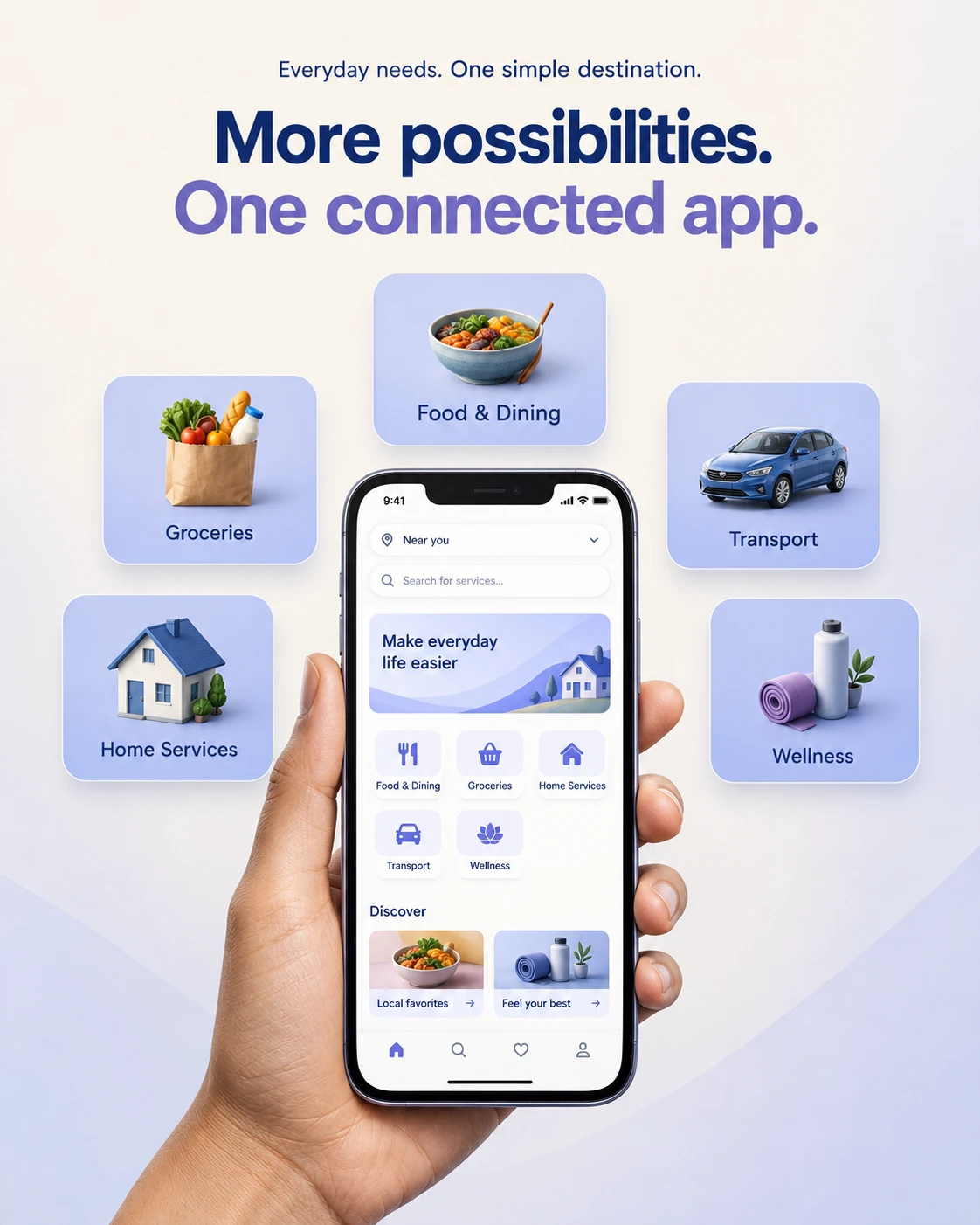
Create a clean mobile-platform advertisement showing a hand-held smartphone surrounded by five service-category cards. The core idea is that several everyday needs connect through one convenient digital destination.
OPTIONAL CUSTOMIZATION
• App details: [Use supplied app description]
• Screen: [Use attached screenshot if available]
• Services: [Automatically use the default categories below]
• Palette: [Warm ivory, muted periwinkle, deep indigo]
• Aspect ratio: [4:5 portrait]
AUTOMATIC CONTENT RULES
If an app screenshot is attached, preserve its recognizable interface structure, colors, and functional hierarchy. Remove brand logos and personal account information for this design.
If written app details are supplied, create a plausible interface based on those details.
If neither is provided, automatically create an unbranded everyday-services app featuring food, groceries, transport, home services, and wellness appointments. Do not ask for clarification or insert an unrelated physical product.
Treat the advertisement reference as layout guidance, not as proof of available features. Ignore unchanged placeholders.
DEFAULT COPY
Small introductory line:
“Everyday needs. One simple destination.”
Main headline:
“More possibilities.”
“One connected app.”
Service cards:
“Food & Dining”
“Groceries”
“Home Services”
“Transport”
“Wellness”
Adapt the copy and categories to the supplied app. Do not invent discounts, user counts, guarantees, or delivery times.
COMPOSITION
Use a soft ivory-to-pale-periwinkle background with generous negative space.
Center the headline across the upper quarter. Use a bold contemporary sans-serif in deep indigo, highlighting the second line in muted violet.
Place a realistic hand holding a modern smartphone upright in the lower center. Let the wrist crop naturally at the bottom. Keep the screen nearly front-facing and large enough to understand at a glance.
Arrange five rounded service cards around the phone: one above it, two to the left, and two to the right. Maintain comfortable gaps and balanced spacing.
SERVICE CARDS
Use consistent periwinkle cards with subtle depth and restrained rounded corners. Place one small three-dimensional category illustration above each label: meal, grocery bag, house, car, and appointment symbol.
Keep icon perspective and rendering style consistent. Do not use logos, certification symbols, or overly detailed mini-scenes.
PHONE SCREEN
Show a simple location/search bar, a restrained welcome banner, a clear service grid, and two small discovery cards below.
Use readable short interface labels. Do not add fake offers or dense illegible text. Keep the layout coherent and appropriate to the supplied service categories.
HAND AND LIGHTING
Render natural fingers gripping the device edges without covering key content. Use accurate anatomy, subtle skin texture, and soft studio illumination.
Show realistic glass reflections and phone-edge highlights while keeping the screen readable. Add a gentle shadow behind the hand and device, not a heavy cutout outline.
FINISH
Preserve the reference’s centered phone, surrounding service cards, clean hierarchy, and light atmosphere. Change the palette, card spacing, headline, and interface styling subtly.
No brand logos, invented websites, contact details, retailer badges, or watermarks. Output one complete portrait app advertisement.