App & Tech Ads
App Launching Soon Teaser
3:40 likesApp & Tech AdsCinematic
Prompt
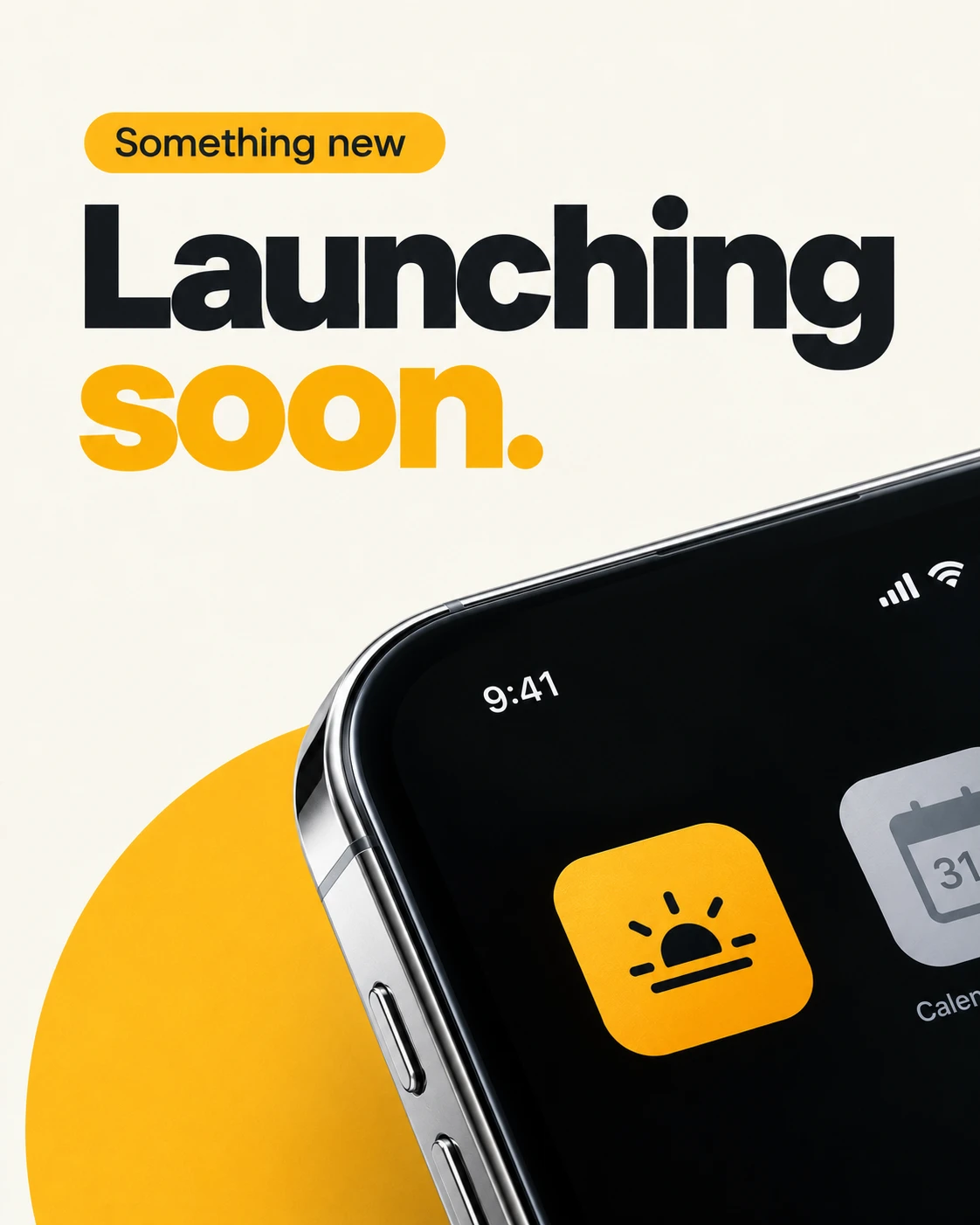
Create a minimal app-launch teaser using oversized typography and a dramatically cropped smartphone. The concept is anticipation: announce the upcoming launch while revealing only a small part of the app’s presence on a home screen.
OPTIONAL CUSTOMIZATION
• App details: [Use supplied name, screenshot, or description]
• Main accent: [Warm marigold]
• Background: [Clean warm white]
• Main text: [“Something new” / “Launching” / “soon.”]
• Aspect ratio: [4:5 portrait]
AUTOMATIC CONTENT RULES
If an app screenshot is attached, use the relevant home-screen icon or visual identity, removing brand logos for this design.
If app details are supplied without an image, create a suitable generic app tile. If neither is supplied, use a simple marigold rounded-square icon with a small black interface symbol.
Do not ask questions, print placeholders, invent launch dates, or claim that downloads are already available.
COMPOSITION
Use an uncluttered white canvas with a large typographic announcement occupying the upper half.
Place a small marigold capsule above the main headline containing:
“Something new”
Below it, set:
“Launching”
“soon.”
Use enormous bold geometric sans-serif lettering. Make “Launching” near-black and “soon.” marigold. Keep the letterforms clean, with tight but readable spacing and comfortable outer margins.
POSITION OF THE PHONE
Bring an oversized smartphone into the lower half from the bottom-right corner. Tilt it diagonally so its upper edge rises toward the right.
Crop the phone heavily beyond the lower and right edges. Reveal its rounded upper-left corner, reflective metal rail, black screen, and one featured app tile.
Keep the device below the main announcement rather than covering the headline. Its large scale should create a sense of an imminent reveal.
SCREEN CONTENT
Use a simple white status time and one marigold featured app tile near the visible lower-center area.
Include only a partial neighboring generic calendar or utility tile at the far-right crop. Do not use recognizable third-party logos or fill the screen with unnecessary apps.
Keep all screen content aligned to the device’s perspective. Avoid warped numerals and uneven icon corners.
BACKGROUND ACCENT
Place a large partial marigold circle behind the phone, entering from the lower-left edge. Let it echo the featured icon and “soon.” text.
The circle is a flat graphic element, not a glowing halo. Keep it secondary to the typography.
LIGHTING AND FINISH
Use clean studio lighting with a restrained metal highlight and realistic glass reflections. Keep the black screen deep and the edges crisp.
Maintain the reference’s white space, black-and-yellow contrast, oversized launch typography, and cropped-device reveal. Change the exact accent shade, wording, phone angle, and circle placement subtly.
No top logo, extra headline, invented countdown, download badges, website, or watermark. Output one complete portrait app-launch poster.